> For the complete documentation index, see [llms.txt](https://dentaltap.gitbook.io/dentaltap/llms.txt). Markdown versions of documentation pages are available by appending `.md` to page URLs; this page is available as [Markdown](https://dentaltap.gitbook.io/dentaltap/scheduling/patient-questionnaire-consent.md).
# Kiosk - Questionnaire & Consent
This page covers how patient information is collected and verified **before clinical work begins**. Intake can be completed by the patient (in-clinic kiosk or via notifications remotely), or assisted by staff.
**Configuration**
1. Questionnaire form:\
[Settings -> Glossary -> Questionnaire](https://app.dentaltap.com/en/p/settings/templates/dictionary?id=questionnaire)
2. Consent forms:\
[Settings -> Documents](https://app.dentaltap.com/en/p/settings/clinic/documents)
3. Clinic Portal/Kiosk:\
[Settings -> Portal](https://app.dentaltap.com/en/p/settings/clinic/portal)
4. Notifications: \
[Settings -> Notifications](https://app.dentaltap.com/en/p/settings/clinic/notifications)
### Purpose
* Collect up-to-date medical and dental history
* Sign & collect required consent forms
* Identify risks, allergies, and alerts early and transfer them into medical history automatically
* Reduce chair-time by completing forms before treatment
### **In-Clinic Kiosk / Self Check‑In**
This is a preferred method to complete questionnaires and consent forms, so patients access via a separate portal and do not see any private data stored inside the Dentaltap.
* Patient completes forms on a tablet or phone
* Suitable for waiting room or pre-visit completion
You can open a kiosk form from the patient profile:
* Click on the **···** (3-dots) icon next to "Edit" icon.
* Select **Open Kiosk** option.
* Configure kiosk form in the opened window - to include questionnaire, and, optionally, consent forms.
### **Patient Notifications**
You can include the questionnaire and the consent form into patient notification, for example, in those scenarios:
* Creating new patient file
* Creating an appointment
You can view & edit notification templates here:\
[Settings -> Notifications](https://app.dentaltap.com/en/p/settings/clinic/notifications)
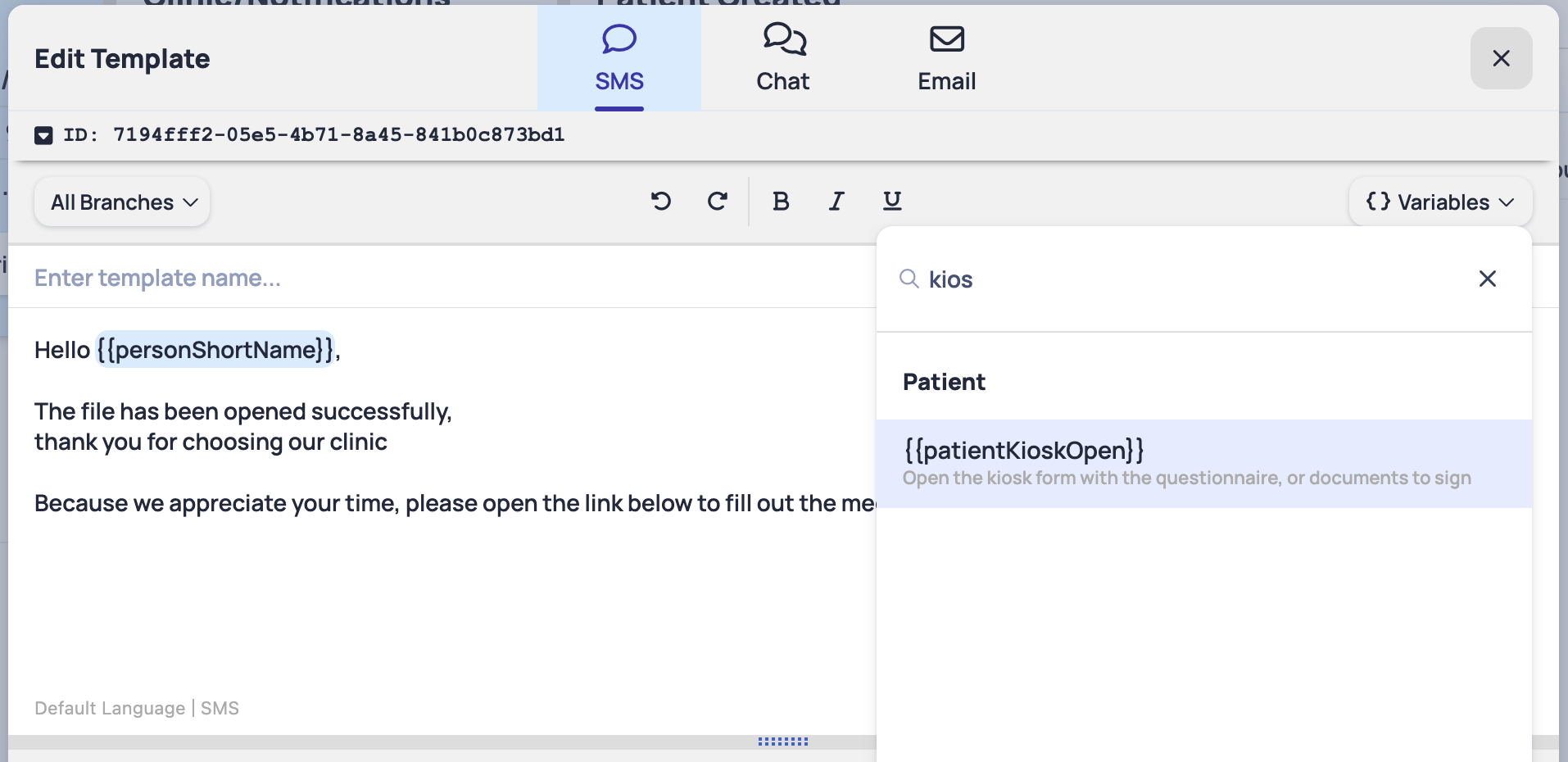
To include a kiosk form in your notification, please search for `patientKioskOpen` variable:
### **In-Clinic Assisted Questionnaires**
Both questionnaires and consent forms can be also completed via the Doctors/Clinics account inside the main application.
To create, view, sign and manage questionnaires, use the **Questionnaires** tab:
* Staff completes forms together with the patient
* Recommended for elderly patients or complex cases
**Signature Pad/Signature Window**
For most of the records in patient file - consent forms, questionnaires, prescriptions, invoices - there's a signature pad available within the main application.
You may use it with any signature pad devices to sign easily.
### **In-Clinic Consent Forms**
Simiar to questionnaires, you can generate and sign consent forms via the main application.
To create, view, print and sign consent forms use the **Documents** tab: