> For the complete documentation index, see [llms.txt](https://dentaltap.gitbook.io/dentaltap/llms.txt). Markdown versions of documentation pages are available by appending `.md` to page URLs; this page is available as [Markdown](https://dentaltap.gitbook.io/dentaltap/storage/work-with-x-rays.md).
# Work with X-Rays
The X-Ray module provides a dedicated workspace for managing dental radiographs. While X-ray files are stored in the main Storage module, they are also accessible through a specialized X-Ray page designed for clinical review.
### Open X-Ray View
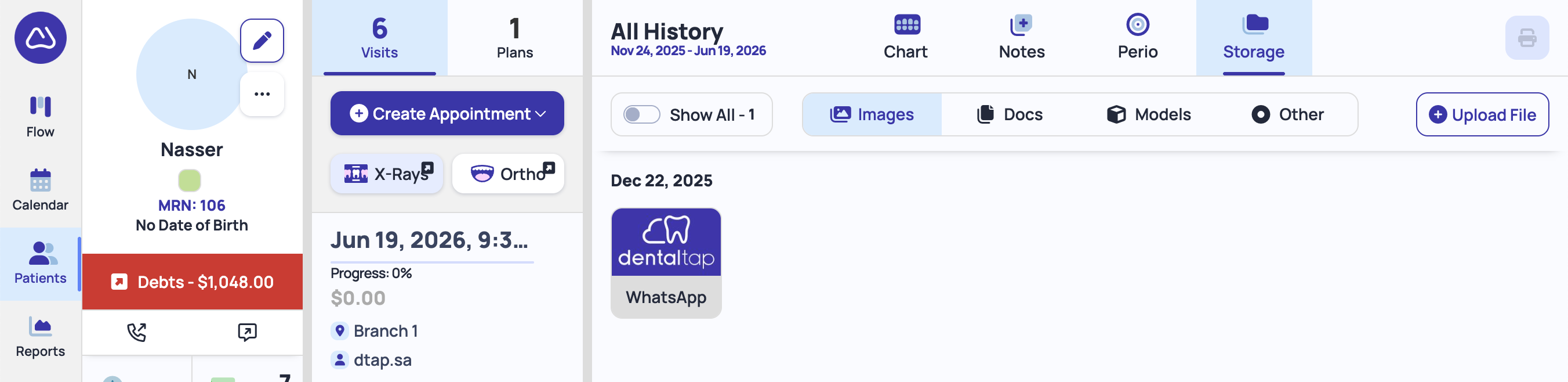
To open X-Ray view, click on the **X-Ray** button under the visits tab (middle column):
### Submit X-Rays
You can drag-and-drop X-Rays from your computer into dedicated section of the FMX layout:
1. Select **Appointment** date from the left column - X-Ray image will be attached with the patient appointment
2. Click on the FMX Layout section, or drag-and-drop from your computer:
The **FMX (Full Mouth Series) layout** allow clinicians to organize and view radiographs in a structured, full-mouth format. This makes it easier to review, compare, and interpret X-rays during diagnosis and treatment planning.