> For the complete documentation index, see [llms.txt](https://dentaltap.gitbook.io/dentaltap/llms.txt). Markdown versions of documentation pages are available by appending `.md` to page URLs; this page is available as [Markdown](https://dentaltap.gitbook.io/dentaltap/treatments/ai-clinical-note.md).
# AI Clinical Note
At the end of each appointment, clinicians can choose to generate a clinical note automatically instead of writing a full summary manually.
The AI Clinical Note Summary compiles and analyzes data recorded during the visit, including:
* Performed procedures
* Patient questionnaires
* Recorded vitals
* Clinical exams
* Periodontal charts
Based on this information, the system generates a structured clinical summary that can be reviewed, edited, and approved by the clinician before saving.
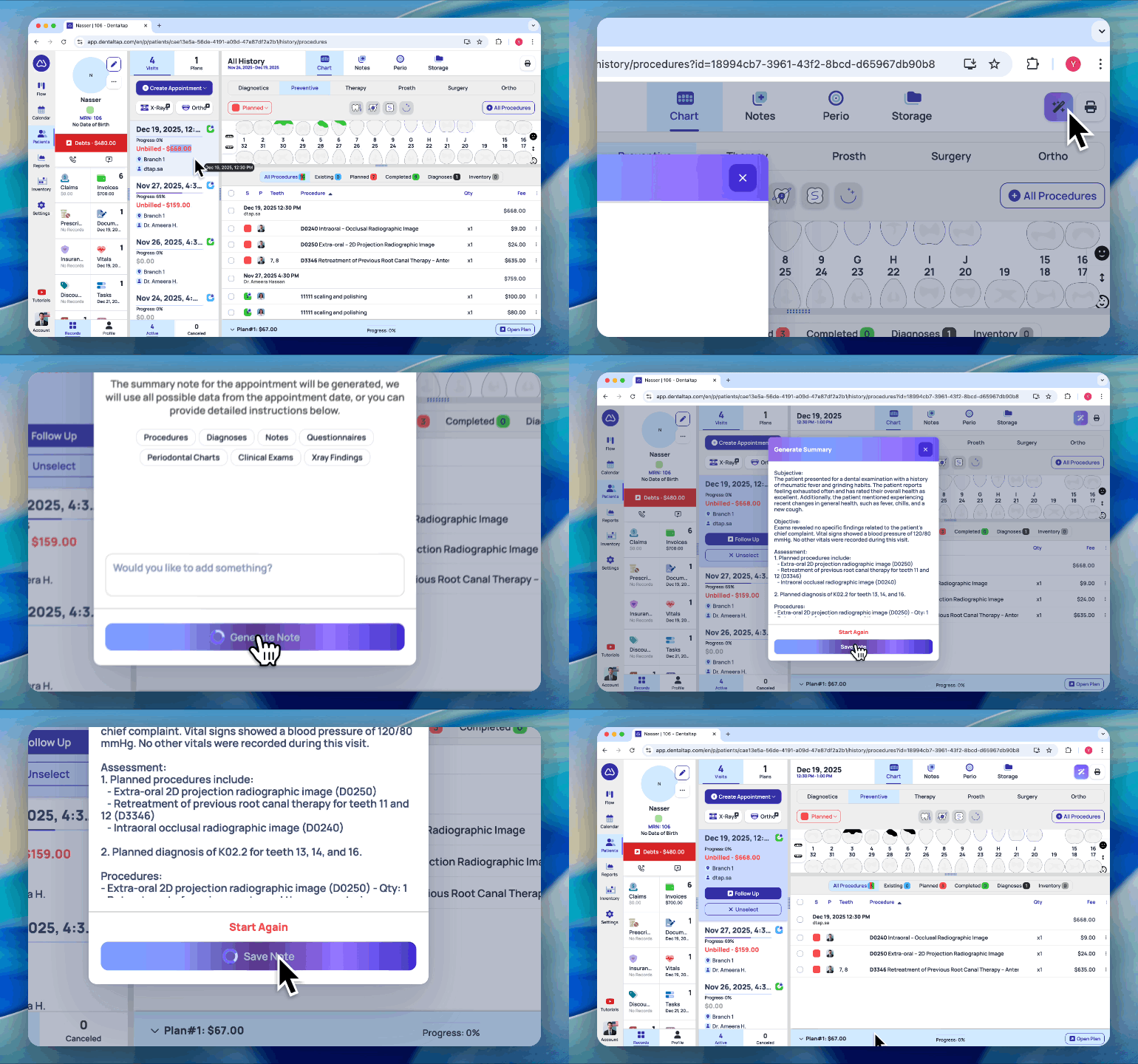
To generate an AI clinical summary, select the appointment date and click the special button. In the opened window, you can add additional instructions or highlight any important details to include in the note.
The system generates the summary within a few seconds. You can then review, edit, and save the note to the patient’s record.
### Review Clinical Note
You can find the generated or updated Clinical Note summary under the **Notes** - **Summary** tab:
This automated approach reduces documentation time while ensuring that clinical notes remain complete, consistent, and accurately aligned with the recorded clinical data.