> For the complete documentation index, see [llms.txt](https://dentaltap.gitbook.io/dentaltap/llms.txt). Markdown versions of documentation pages are available by appending `.md` to page URLs; this page is available as [Markdown](https://dentaltap.gitbook.io/dentaltap/treatments/dental-chart.md).
# Dental Chart
The Dental Chart is used to visually record the patient’s oral condition. It provides a clear, structured view of existing conditions and serves as the clinical baseline for examination and treatment planning.
The dental chart is typically completed **after vitals** and **before the clinical exam**.
**Configuration**
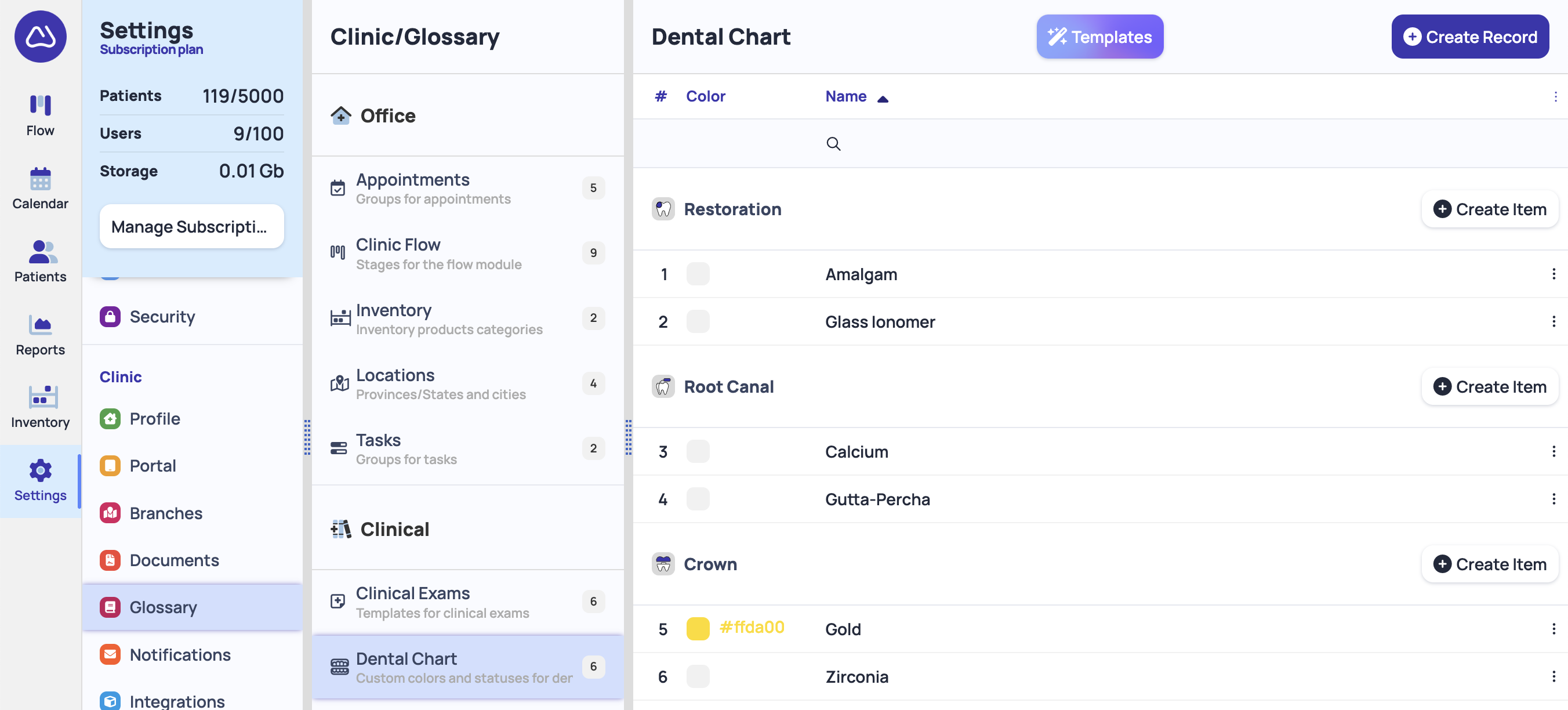
1. Setup custom Dental Chart items: \
[Settings -> Glossary -> Dental Chart](https://app.dentaltap.com/en/p/settings/templates/dictionary?id=dentalChart)
### Purpose
* Document existing dental conditions
* Provide a visual overview of oral health
* Support diagnosis and treatment planning
* Maintain an accurate clinical history
### Dental Chart Conditions
Diagnostics
* Missing (K08.1)
* Impacted (K01.1)
* Mobility (K08.8)
* Caries (K02): Stage 1 – Enamel (K02.0), Stage 2 – Dentine (K02.1), Stage 3 – Cementum (K02.2), Stage 4 – Arrested (K02.3)
* Defect (K03): Attrition (K03.0), Abrasion (K03.1), Erosion (K03.2), Cracked – non-traumatic (K03.81), Fracture – traumatic (S02.5)
* Pulpitis (K04): Pulpitis (K04.0), Necrosis of pulp (K04.1), Pulp degeneration (K04.2), Abnormal pulp formation (K04.3), Other / unspecified (K04.9)
* Abscess (K04a): Acute apical periodontitis (K04.4), Chronic apical periodontitis (K04.5), Periapical abscess with sinus (K04.6), Periapical abscess without sinus (K04.7), Radicular cyst (K04.8)
* Gingiva (K05): Acute gingivitis (K05.0), Chronic gingivitis (K05.1), Acute periodontitis (K05.2), Chronic periodontitis (K05.3)
* Gum (K06): Gingival recession (K06.0), Gingival enlargement (K06.1)
Preventive
* Cleaning
* Fluoride
* Sealant
* Whitening
Therapy
* Restoration (Fill): Permanent, Temporary
* Root Canal (RCT): Permanent, Temporary
* Post & Core (P & C)
Prosthodontics
* Veneer
* Onlay
* Crown: Permanent, Temporary
* Denture
* Bridge
Surgery
* Extraction
* Implant
* Sinus Lift
* Bone Graft
* Resection
Orthodontics
* Spacer
* Braces
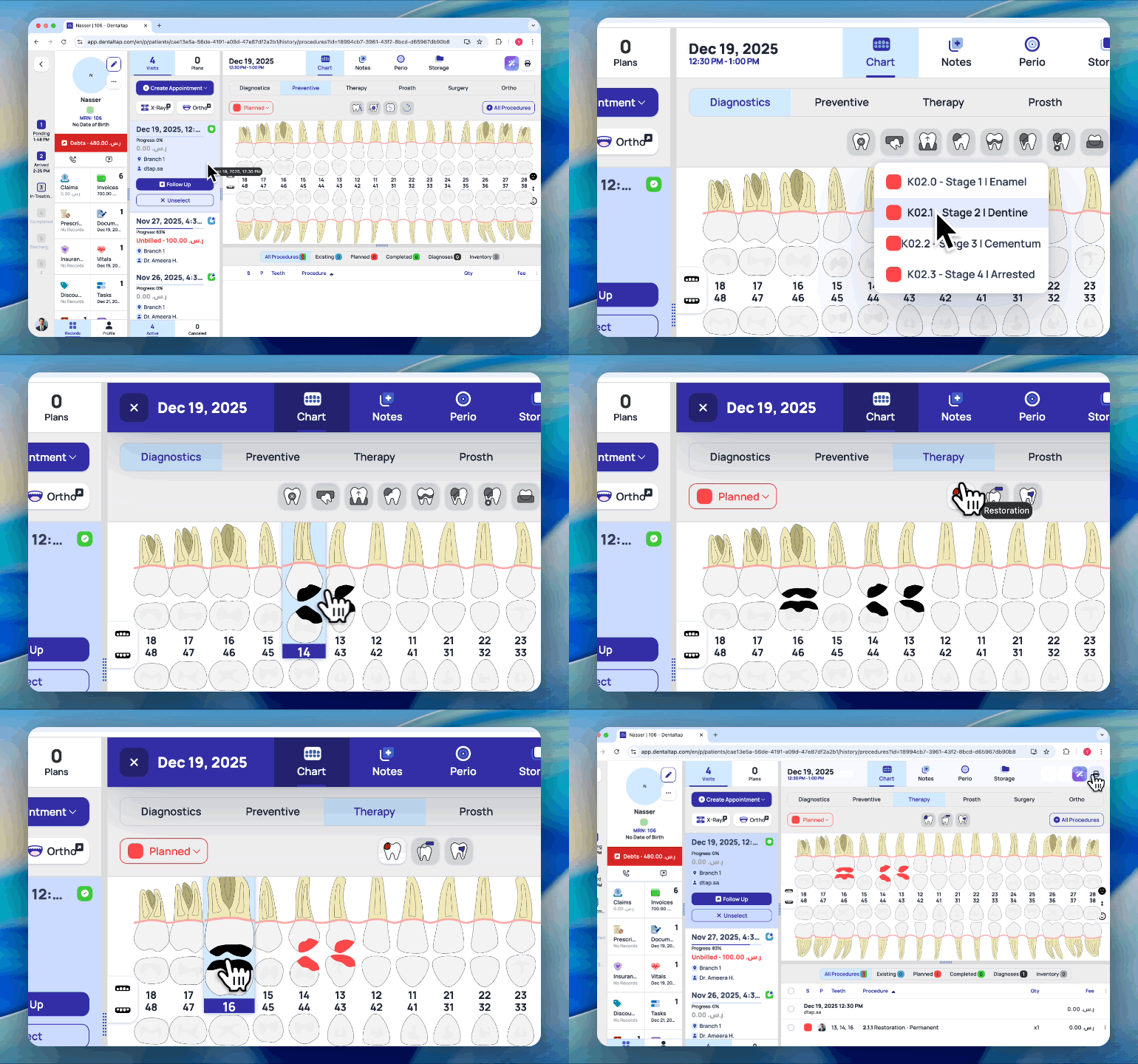
To start dental charting, select **Procedure** or **Diagnosis** and then apply it to specific teeth:
You can create procedures with 3 different statuses - Existing, Planned, Completed.
### Custom colors
Dentaltap allows custom colors to be assigned to each dental chart condition. Colors can be used to represent materials, procedure types, or any other clinical or visual classification defined by the clinic.
This flexibility helps improve chart readability, enables faster recognition of conditions, and allows clinics to align the chart with their internal standards or preferences.
You can add custom colors for each procedure in Settings:\
[Settings -> Glossary -> Dental Chart](https://app.dentaltap.com/en/p/settings/templates/dictionary?id=dentalChart)
### Dentitions - Primary, Permanent, Mixed
Dentaltap supports all types of dentition, including mixed dentition, where permanent and primary teeth can be used together as needed.
Use controls at the right to change the dentition:
The Dental Chart provides a visual and structured representation of the patient’s oral condition, serving as the clinical baseline for examinations, treatment planning, and procedure recording.